Step 1: Run a Publication
Publishing should be a button, not a project. Run a seeded job to see the complete path from job list to published site.
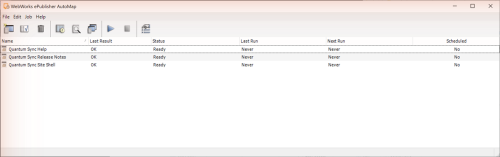
Open WebWorks ePublisher AutoMap Administrator (Start > WebWorks > ePublisher AutoMap). The job list already holds the three seeded jobs, Quantum Sync Help, Quantum Sync Release Notes, and Quantum Sync Site Shell; none has run yet (Last Run reads Never).
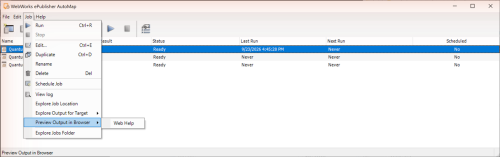
Select Quantum Sync Help and choose Job > Run. When Windows opens the scheduled-task properties (AutoMap runs each job as a scheduled task), click OK to accept the defaults. A console window shows the build; when Status returns to Ready, Last Run shows the time and Last Result reads OK (a minute or two).
Choose Job > View log. The log ends
0 warning(s), 0 error(s) reported..Choose Job > Preview Output in Browser > Web Help to open the Quantum Sync help site. Then choose Job > Explore Output for Target > Web Help to open
Documents\WebWorks ePublisher AutoMap\Output\Quantum Sync Help.
Tip: Quantum Sync Release Notes is the job that changes often; Step 4 makes it run itself.